standup.

Standup app dashboard
Timeline
February 2026
Team
Solo!
Overview
A personal accountability app built around one idea: the gap between your morning plan and your evening reality is where growth happens. Two 30-second check-ins per day, an AI coach that reads 14 days of history to surface non-obvious patterns, weekly digests with shareable public links, and a dashboard tracking streaks, follow-through rate, and mood trends. All wrapped in a heavily animated dark-mode UI with WebGL shader backgrounds and physics-based card interactions.
Tools
Rails, React, TypeScript, OpenAI, PostgreSQL, Vite, GSAP, WebGL

Background

Most productivity tools focus on task management: lists, checkboxes, due dates. But I wanted something different: a tool that captures intent vs. reality across days and uses that delta to surface behavioral patterns.

The concept is simple. Every morning, you write what you plan to do. Every evening, you write what actually happened. Over time, the gap between those two entries reveals your real patterns: recurring blockers, energy cycles, follow-through tendencies. Things you can't see in a single day but that become obvious across weeks.

The core requirements:

Plan vs. Reality

Capture morning intent and evening reflection as a paired daily ritual, not a task list.

Pattern Detection

Use AI to analyze 14 days of history and surface non-obvious behavioral patterns the user wouldn't notice themselves.

Accountability Metrics

Track streaks, follow-through rate (% of mornings that get an evening reflection), and mood trends over time.

Shareable Digests

Generate weekly AI summaries with wins, patterns, and blocker analysis, shareable via a public link without exposing sensitive data.

Architecture

The system is a decoupled monorepo: a Rails API backend and a React SPA frontend, communicating over a typed REST API with JWT auth and automatic timezone synchronization on every request.

React SPA

Vite + TypeScriptMotion / GSAP / OGLRecharts

X-Timezone · Bearer JWT

Rails 8.1 API

RESTful endpointsJWT authAI orchestration

PostgreSQL

Users, check-ins, digests

OpenAI

Nudge, summary, digest

Public Share

Token-based, no auth

The backend is a Rails 8.1 API-only app with no views and no asset pipeline. The frontend is a Vite-powered React 19 SPA with TypeScript. They're fully decoupled: the frontend sends X-Timezone on every request so the server always knows the user's local “today,” and JWT tokens are stored in localStorage. The AI layer is a single service class that talks to OpenAI's chat completions API via raw Net::HTTP. No SDK, no background jobs, no queues.

Check-In System

The check-in system is the core of the app. It enforces a simple but strict contract: one morning check-in and one evening reflection per calendar day per user.

Data Model

Rather than separate models for morning and evening entries, I used a single checkins table with an enum. This was the key design decision. It keeps queries simple and lets the database enforce the business rule:

ruby
1class Checkin < ApplicationRecord
2 belongs_to :user
3
4 enum :checkin_type, { morning: 0, evening: 1 }
5
6 validates :checkin_type, presence: true
7 validates :date, presence: true
8 validates :feeling, inclusion: { in: 0..10 }, allow_nil: true
9 validates :checkin_type, uniqueness: { scope: [ :user_id, :date ],
10 message: "already exists for this date" }
11
12 validates :today_plan, presence: true, if: :morning?
13 validates :what_happened, presence: true, if: :evening?
14
15 scope :for_date, ->(date) { where(date: date) }
16 scope :for_range, ->(start_date, end_date) { where(date: start_date..end_date) }
17 scope :mornings, -> { where(checkin_type: :morning) }
18 scope :evenings, -> { where(checkin_type: :evening) }
19 scope :recent, -> { order(date: :desc, checkin_type: :asc) }
20end

The composite unique index on [user_id, date, checkin_type] enforces “one morning, one evening per day” at the database level, not just in application validation. Conditional presence validators (today_plan required for mornings, what_happened required for evenings) mean each check-in type collects the right fields without separate models or STI.

Timezone Sync

One of the trickiest parts of a daily check-in app is answering: “What day is it?” If the user is in Tokyo and the server is in UTC, “today” is a different date. I solved this by auto-syncing the user's timezone on every authenticated request:

ruby
1def current_date
2 Time.use_zone(user_timezone) { Time.zone.today }
3rescue ArgumentError
4 Date.today
5end
6
7def sync_timezone_from_header
8 tz = request.headers["X-Timezone"]
9 return if tz.blank? || @current_user.nil?
10 return if tz == @current_user.timezone
11
12 Time.use_zone(tz) { nil } # validate the timezone identifier
13 @current_user.update_column(:timezone, tz)
14rescue ArgumentError
15 # invalid timezone identifier, ignore
16end

The frontend detects the browser's IANA timezone via Intl.DateTimeFormat and attaches it as an X-Timezone header on every API call. update_column intentionally skips validations and callbacks. This is a high-frequency, low-risk write; the timezone just silently stays in sync.

Morning / Evening Flow

A single today endpoint returns both morning and evening check-ins for the user's current local date. The frontend uses this to determine which cards are filled, which are waiting for input, and whether to show the “day complete” state.

AI Coach

The AI layer is built as a single service class (AiService) that handles three distinct operations: post-check-in nudges, daily summaries, and weekly digests. All use OpenAI's GPT-4o-mini via raw HTTP. No SDK, no abstractions.

Nudge Engine

The nudge is the most user-facing AI feature. After each check-in, the frontend fires a request to generate a one-sentence observation based on the user's recent history:

ruby
1def self.generate_nudge(user, current_checkin)
2 recent_checkins = user.checkins
3 .where("date >= ?", 14.days.ago.to_date)
4 .order(date: :desc, checkin_type: :asc)
5 .limit(30)
6
7 return nil if recent_checkins.size < 3
8
9 name = user.name
10 prompt = build_nudge_prompt(recent_checkins, current_checkin, name)
11 response = chat(prompt, system: "You are a blunt, slightly quirky coach " \
12 "talking to #{name}. Speak in second person (you/your), be specific " \
13 "and honest, and let your personality show with things like :) or a " \
14 "dry observation. No sugarcoating, no generic advice, no em dashes. " \
15 "Respond in JSON only.")
16
17 parsed = JSON.parse(response)
18 nudge_text = parsed["nudge"]
19 nudge_text.present? && nudge_text != "null" ? nudge_text : nil
20rescue JSON::ParserError, StandardError
21 nil
22end

Key design decisions: the nudge requires at least 3 recent check-ins before activating, since pattern-matching on a single data point is not useful. The prompt explicitly instructs the model to find non-obvious patterns and avoid echoing what the user just wrote:

ruby
1<<~PROMPT
2 Here's #{user_name || 'this person'}'s standup history for the last
3 2 weeks and their check-in today. Spot a NON-OBVIOUS pattern and
4 call it out directly.
5
6 Return a JSON object with:
7 - "nudge": One blunt sentence (max 25 words) addressed directly to
8 them using "you". Surface something they likely haven't noticed —
9 recurring blockers, feeling trends, forgotten goals, day-of-week
10 dips, plan-vs-reality gaps. If there's genuinely nothing worth
11 saying, return "nudge": null.
12
13 Rules:
14 - Don't echo what they just said. They know what they wrote.
15 - No cheerleading. No "Great job!" Be specific and direct.
16 - Reference real data from their history.
17 - Work AND personal life are fair game.
18PROMPT

The nudge is best-effort. If OpenAI fails, parsing fails, or there's not enough history, it silently returns nil and the frontend just doesn't show anything.

Daily Summaries

Daily summaries take a morning/evening pair and produce a structured coach diagnosis. The prompt asks for a specific JSON contract, and the output is formatted into a four-part framework:

Reality check

One blunt sentence about the most important thing today

Focus now

The single priority that actually matters

First step

A tiny concrete action doable in 5–10 minutes

Fallback

"If X happens, then do Y" as a safety net

Every field has a sensible fallback, so even if the model returns a partial or malformed response, the user always sees actionable output.

Weekly Digests

Weekly digests aggregate a full week of check-ins plus daily summaries into a narrative recap. The prompt packs each day's morning/evening data, feelings, and AI insights into a structured format, then asks for wins, patterns, and blocker analysis.

The critical design decision: the controller computes server-side metrics independently of the AI response.

ruby
1feelings = checkins.filter_map(&:feeling)
2morning_dates = checkins.select(&:morning?).map(&:date).uniq
3evening_dates = checkins.select(&:evening?).map(&:date).uniq
4paired = (morning_dates & evening_dates).size
5
6{
7 ai_digest: parsed["digest"],
8 wins: parsed["wins"],
9 patterns: parsed["patterns"],
10 blocker_patterns: parsed["blocker_patterns"],
11 avg_energy: feelings.any? ? (feelings.sum.to_f / feelings.size).round(0) : nil,
12 completion_rate: morning_dates.any? ? (paired.to_f / morning_dates.size * 100).round(0) : nil
13}

Average energy and completion rate are calculated from raw check-in data, not from the model's output. The AI provides narrative analysis, but the hard metrics are computed deterministically. You never want the model deciding what your completion rate is.

Dashboard

The dashboard gives users an at-a-glance view of their accountability data through four bento-style stat cards and two time-series visualizations.

Streak Algorithm

Streak calculation loads all distinct check-in dates in a single query, then walks backwards from today in Ruby:

ruby
1def calculate_streak(checkins, from_date)
2 dates_with_checkins = checkins
3 .where(date: (from_date - 365.days)..from_date)
4 .distinct.pluck(:date)
5 .sort
6 .reverse
7
8 streak = 0
9 expected = from_date
10 dates_with_checkins.each do |d|
11 break if d != expected
12 streak += 1
13 expected -= 1.day
14 end
15
16 streak
17end

This avoids N+1 queries. One pluck fetches up to 365 dates as an array, then the streak is a linear O(n) walk. The 365-day window caps the query scope without limiting realistic streak lengths.

Follow-Through Metric

“Follow-through” is the percentage of mornings that also have a matching evening reflection on the same date. It's the core accountability metric. It answers “when you set an intention, did you close the loop?”

ruby
1morning_count = checkins.mornings.count
2paired_days = checkins.mornings
3 .where(date: checkins.evenings.select(:date))
4 .select(:date).distinct.count
5completion_rate = morning_count > 0 ?
6 (paired_days.to_f / morning_count * 100).round(0) : 0

The query uses a subquery to find mornings whose dates also appear in the evenings set. This runs as a single SQL query, not two separate fetches.

Feeling data is aggregated per-day and rendered as a Recharts area chart with a gradient fill. Below it, a heatmap shows ternary completion state: none, partial (morning only), or complete (both check-ins). The backend computes all of this in just two queries: group(:date).average(:feeling) for mood data and group(:date, :checkin_type).count for completion flags, then builds the daily array in Ruby.

Frontend

Card Flip Interaction

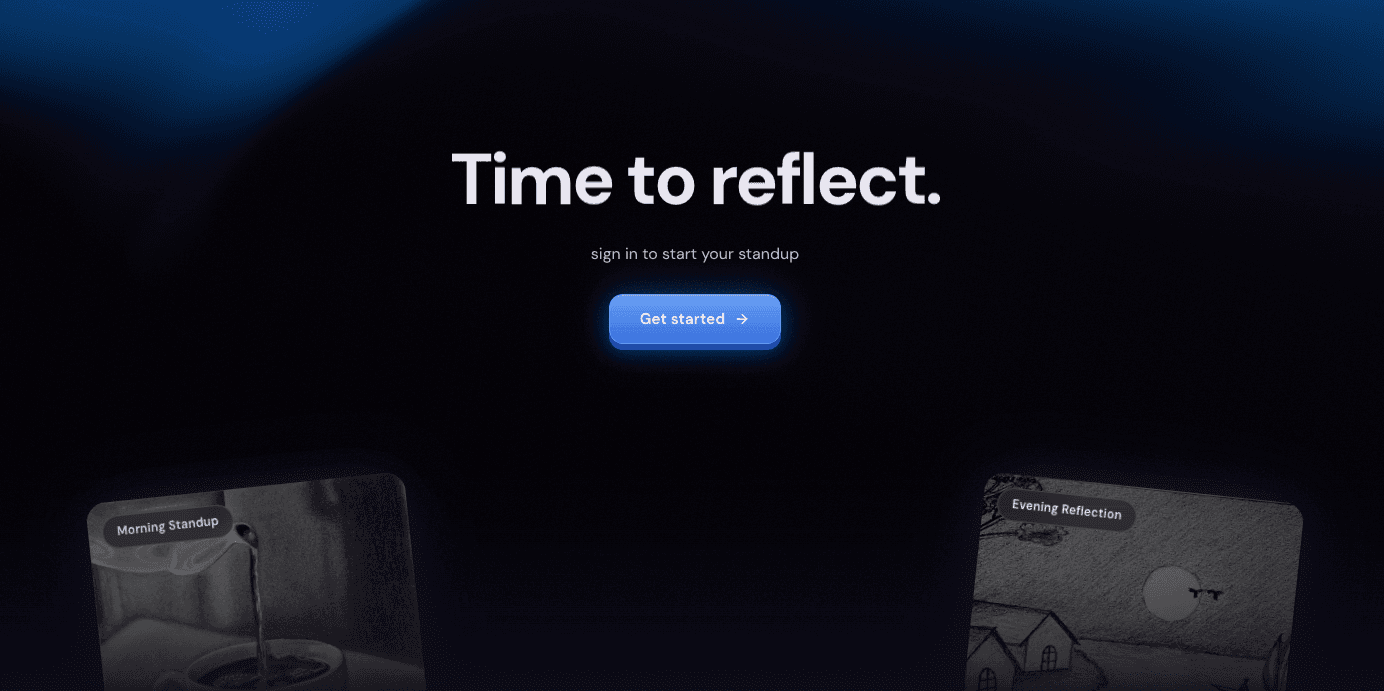
The main Today page uses a 3D card flip interaction for morning and evening check-ins. Each card has a front face (a tilted image card with a daily prompt) and a back face (the check-in form or completed entry).

Framer Motion's layoutId enables a seamless animation from the signed-out state (where the cards float at angles as peek previews) to the signed-in state (where they become full interactive panels). Daily prompts rotate based on the day index for variety without randomness.

The mood selector uses a custom 7-point glyph system where each level has a hand-drawn SVG icon (raindrop for “drained,” flame for “energized,” sun for “great”) instead of a numeric slider. People relate to visual metaphors better than numbers on a scale.

Horizontal Timeline

History uses a horizontal scroll layout where today is leftmost and you scroll right into the past. As you scroll, the container uses elementFromPoint to detect which month the viewport center is in, and a floating month overlay fades in (“March 2026”) then auto-hides after 1.8 seconds of no change. The entire 90-day range loads in a single API call to avoid pagination complexity.

Visual Layer

The app uses a layered visual stack for atmosphere. All components are custom, built without any component library:

DarkVeilOGL / WebGL

Full-screen shader with animated noise, hue shifting, and warp distortion

BlobCursorCanvas

Soft glow that follows the mouse cursor across the viewport

TiltedCardFramer Motion

Physics-based tilt on hover using spring-driven rotateX/Y

SplitTextGSAP

Character-by-character text reveal animations for greetings

BounceCardsFramer Motion

Fanned card layout with hover-to-front interaction for digests

ShinyTextCSS

Animated gradient shine effect on mood labels

Auth & Sharing

JWT Flow

Authentication uses a minimal JWT implementation: no sessions, no cookies, no refresh tokens. Tokens expire after 7 days, stored in localStorage and sent as a Bearer header. On 401 responses, the API client automatically clears the token and forces re-auth.

Pages like History, Dashboard, and Weekly show a LockedOverlay when the user isn't authenticated: a blurred preview with a sign-in prompt rather than a redirect. The Today page is always accessible, showing a marketing-style welcome state with tilted peek cards.

Public Digest

Weekly digests have a shareable public endpoint that requires no authentication. The share URL uses a unique token per digest (not per user), and intentionally omits blocker_patterns. Wins and patterns are shareable, but blockers are private. Only the user's name is exposed, no email or other account data.

Database

The schema is designed around the daily check-in lifecycle with four tables:

Tables

  • users : email (unique, indexed), bcrypt password digest, per-user share token, timezone (default UTC, auto-synced from browser)
  • checkins : morning/evening enum, structured text fields (today_plan, what_happened, blockers, carry_over), feeling (0-10 integer), composite unique index on [user_id, date, checkin_type]
  • daily_summaries : AI-generated summary per user per day, task counts, carry-overs, unique on [user_id, date]
  • weekly_digests : AI digest text, computed metrics (avg_energy, completion_rate), wins/patterns/blocker_patterns, per-digest share token, unique on [user_id, week_start]

Every unique constraint is enforced at the database level, not just in Rails validations. All foreign keys are explicit. Text fields are validated to 2000 characters max. The schema evolved iteratively. Early versions used a single body field; structured fields were added in a later migration while keeping body nullable for backward compatibility.

Deployment

The backend uses a production-ready multi-stage Dockerfile with jemalloc for memory optimization. The entrypoint runs db:prepare before starting the server, handling both initial setup and migrations on deploy. The frontend builds to a static Vite bundle with CORS configured via environment variable.

The AI layer degrades gracefully when OPENAI_API_KEY is absent. AiService.chat returns a static JSON fallback string so all downstream parsers still receive valid JSON. The app is fully functional without AI; the features just show placeholder content.

Results

Concept to deployed product in 36 hours of focused solo work.

< 1 min

Daily check-in time

14 days

AI context window

36 hrs

Concept to deploy

In Hindsight

The most useful decision was modeling check-ins as morning/evening pairs in a single table. One enum, one composite index. That one choice made everything downstream trivial: streaks, follow-through, AI prompts that compare what you planned to what actually happened.

“Constraining what the model shouldn't do matters more than what it should.”

The nudge prompt went through several iterations. The breakthrough was adding explicit negative constraints (“Don't echo what they just said,” “No cheerleading,” “No generic advice”) and gating on a minimum of 3 check-ins before the AI activates at all.

The other thing I didn't expect: the visual polish ended up being load-bearing. WebGL shaders, physics-based card tilts, custom SVG mood glyphs. For a tool you're supposed to open every morning and every evening, the aesthetic is what turns it from a form into a ritual.

What's Next

The main gap right now is that the app relies on you remembering to check in. Adding push notifications for morning/evening reminders would close that loop. Beyond that, wrapping the SPA as a PWA for home screen installation is the obvious next step for a daily-use tool.